Leave repetitive work to robots.
Botream lets you record the work done the same way every day in web apps, ERP screens, Excel and Windows programs once, have robots run it without mistakes, and measure the time you win back. Entirely on your own servers.
Everything a business process needs.
From Excel to email, from databases to REST services; no extra tools.
Excel, CSV and PDF
Read and write row by row, formulas, text from PDFs, split and merge.
Read the inbox, save attachments, send; Microsoft 365 OAuth support.
Databases and APIs
Queries on SQL Server, PostgreSQL, MySQL, Oracle and SQLite; REST requests.
Work queues
Share thousands of items between robots; prevent duplicates, retry failures.
Scheduling
Send tasks to a free robot by time, day or cron expression.
Vaults
Passwords in encrypted vaults; tasks only use the credentials they are allowed to.
Live monitoring
Watch running tasks, live logs, success rates and robot status as they happen.
Automatic updates
Robot machines fetch new versions from the server themselves; never while a task runs.
Roles and audit
Admin, developer and user roles; every security-related action in the audit log.
Record, refine, run, measure.
The person who knows the job shows the process once; Botream turns it into a reliable robot.
Record
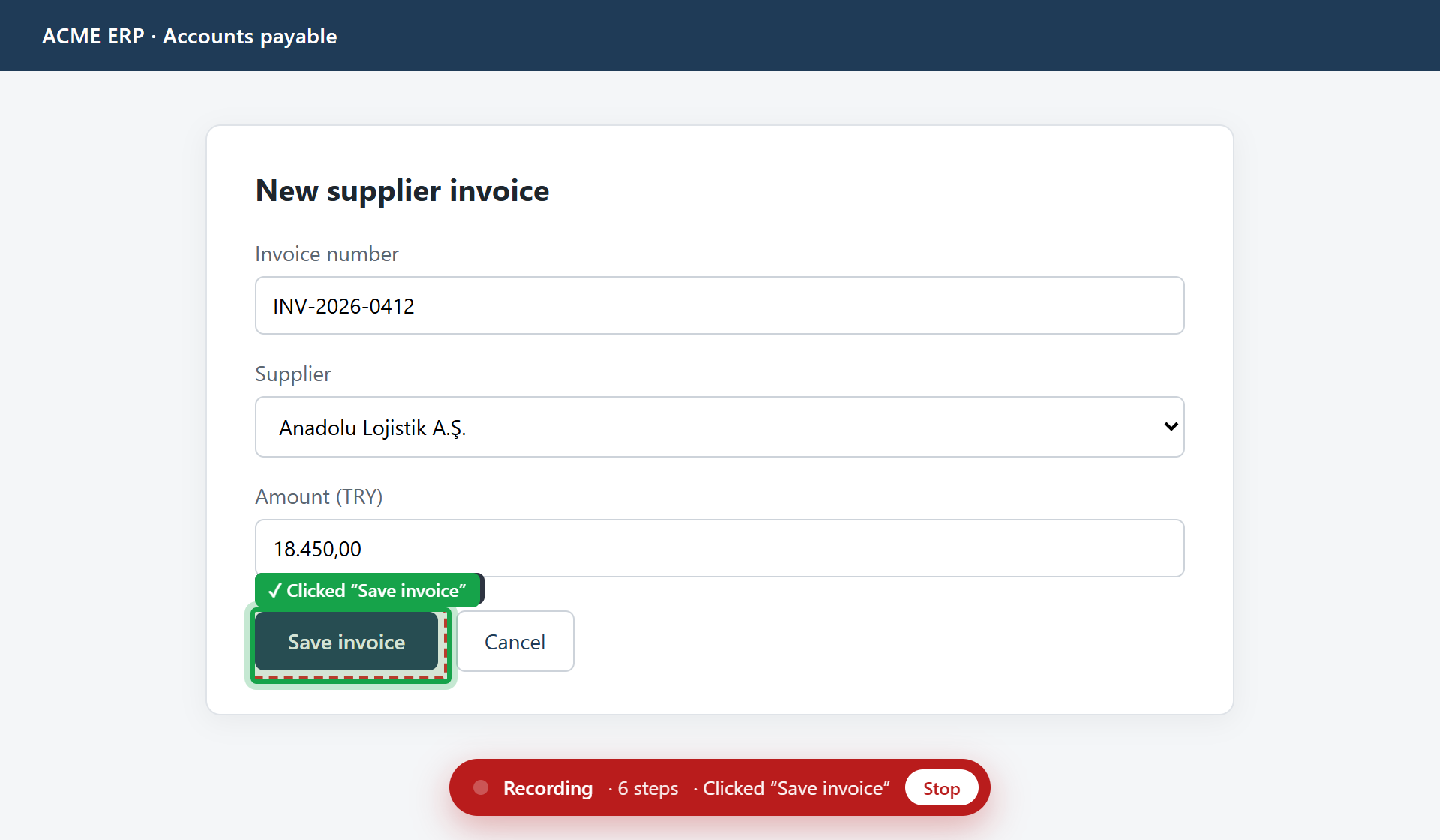
Press Record and do the work as usual: clicks, text and choices in Chrome and steps in Windows programs become commands.
Refine
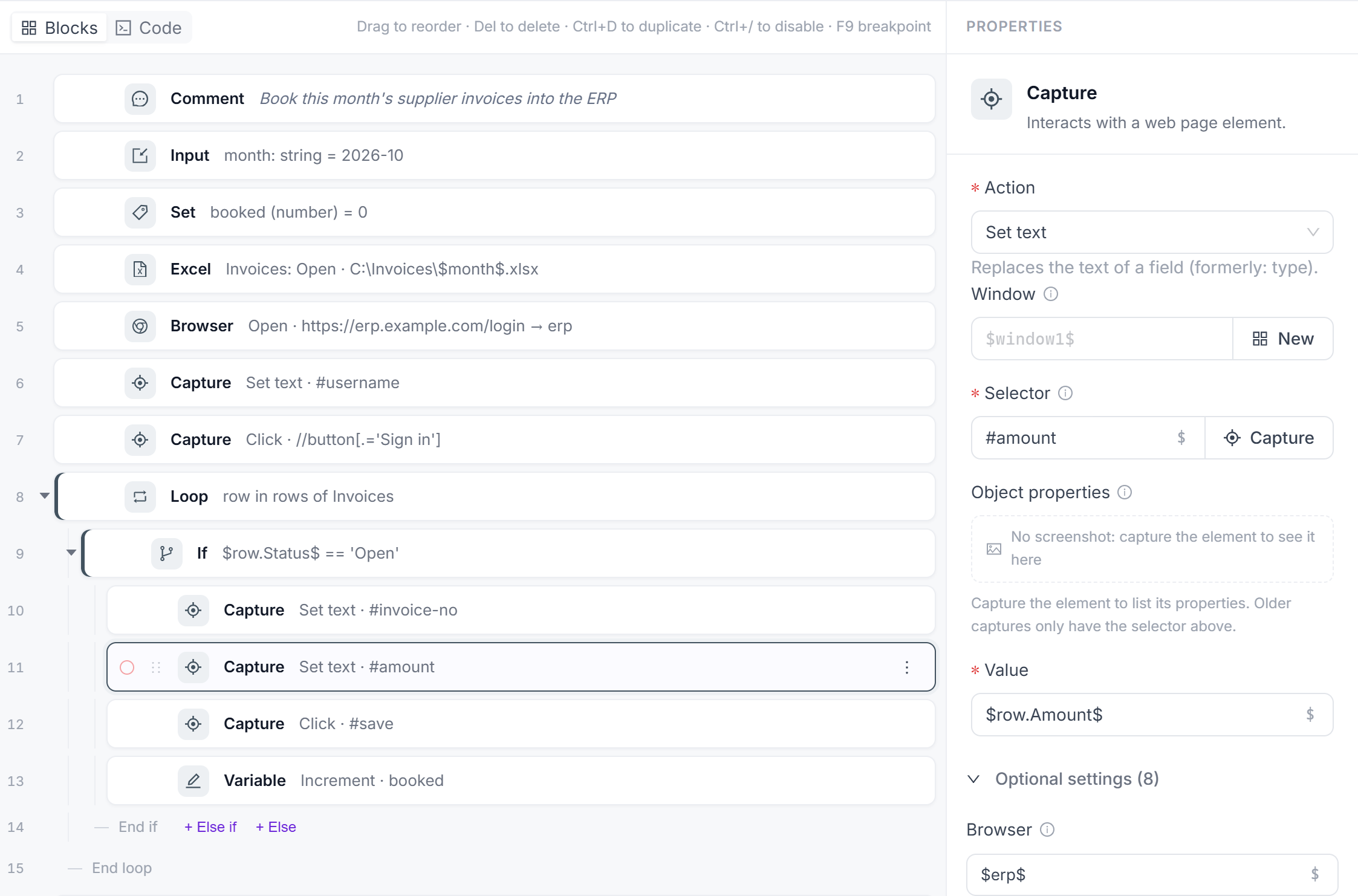
Edit the steps as blocks or as code: loops, conditions, Excel rows, error handling and variables.
Run
Send the task to robot machines, schedule it, or feed it from a work queue. Unattended robots sign in by themselves.
Measure
Compare the robot time of every run with the human time; export the report by business unit to Excel.
Show it once, the robot does it the same way every time.
While recording, the element under the mouse is framed and every recorded step flashes green, so you always see what was captured.
- Browser and desktop together: steps in Chrome and clicks in Windows programs in one recording, in the order they happened.
- Keyboard and mouse: shortcuts, special keys, the mouse wheel and drag and drop are recorded too.
- Passwords are never recorded: password fields ask you to use a credential from a vault.
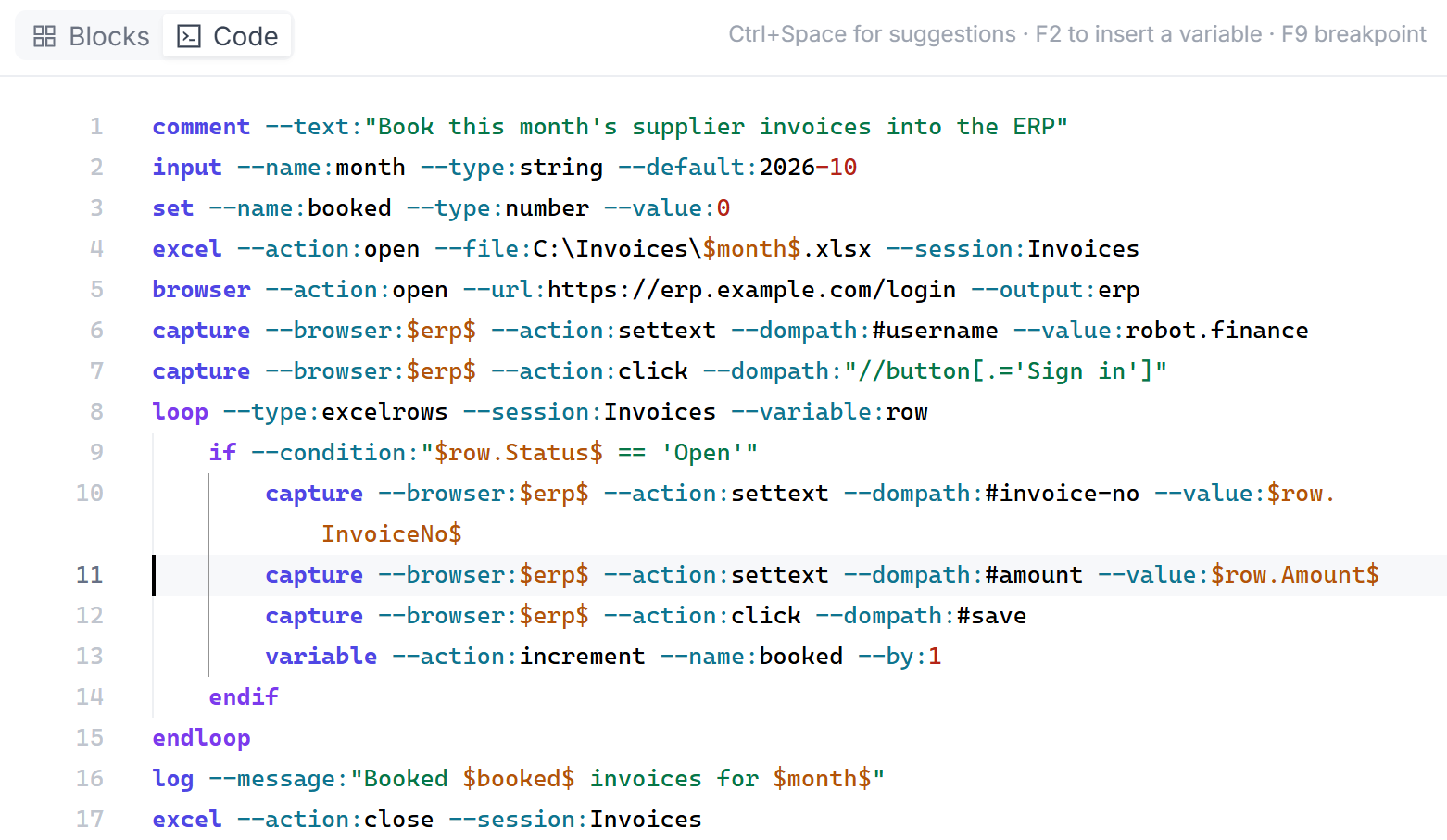
Start with blocks, switch to code whenever you like.
The same task shows as drag-and-drop blocks and as a readable command language. Business experts and developers work on the same task.
- Debugger: breakpoints, step-by-step runs and live variable values.
- Tasks from AI: describe the job and get a draft task.
- Versions: a local working copy, history and published versions; robots always run the approved one.
Robots that finish the job even when the screen changes.
Botream finds elements not by a single selector but by object properties, fallback paths and a stable label nearby. When something goes wrong you get a screenshot of the failure and the variables at that moment.
- Visible while running: a pointer and an orange frame show which step the robot is on.
- Retries and error types: system errors are retried automatically, business rule errors are handled separately.
Show what automation earns by measuring it, not guessing.
For a task or each round of a loop, enter the number of items and the time a person would need. Botream measures the robot time itself and reports the savings by business unit, robot, task, day and month.
- Admin-only report page and one-click Excel export
- Per-round measurement: each of thousands of invoices is its own record
- Successful and failed runs separately
Build faster, pay less, run it on your own servers.
Five things set Botream apart from traditional enterprise RPA platforms: development speed, ease of use, built-in AI, fully on-premise operation and simple pricing.
The "Typical enterprise RPA" column summarises common traits of enterprise RPA platforms on the market; it does not describe any particular product and may not apply to every one.
Two licences, one price.
The server is free. One Bot Creator licence for each user who builds tasks, one Runner licence for each robot that runs them; both $2,000 a year.
Botream Server
The whole platform
- Unlimited tasks, queues and schedules
- Unlimited users who run tasks and follow the results
- AI features, the performance report, vaults and the audit log
- Setup wizard and automatic updates for robots
Bot Creator
Per user who builds tasks
- Recorder, blocks and code editor
- Debugger, versions and publishing
- AI Task Generator and improving recordings with AI
- Every command; no add-on modules
Runner
Per robot that runs tasks
- Attended or unattended: every robot costs the same
- Web, desktop, Excel, email, database and AI commands
- Scheduled runs and runs fed from queues
- Unattended robots that sign in at startup
Try it free for 30 days, with everything enabled. Prices exclude taxes. Ask for a quote →
Installation packages
Install the server first; download the agent for robot machines here or from the server's Agents page. A 30-day trial runs until a licence file is uploaded.
Botream Server
Web interface, API and scheduler; runs as a Windows service. The first setup is done in the browser.
Windows 10/11 or Windows Server, 64-bit · SQL Server 2019 or later (Express is enough)
Download the server (MSI)SHA-256
Botream Agent
The robot that runs tasks; comes with the Chrome extension and the tray app. Installed as attended or unattended.
Windows 10 (1809 or later) or Windows 11, 64-bit
Download the agent (MSI)SHA-256
See the installation guide for step-by-step instructions. Installation guide (PDF)
Your data never leaves the building.
Botream runs entirely on your own servers. No cloud dependency, no data sent outside.
Fully on-premise
Server, database and robots in your network; the only external component is SQL Server.
Installed in minutes
One setup wizard for the server and one for robots; they run as Windows services and the first setup is done in the browser.
Encrypted vaults
Credentials are encrypted with AES-256-GCM and reach robots only while a task runs.
Role-based access
Who sees what, who can run what; every API call is authenticated.
Audit log
Sign-ins, permission changes and vault use are recorded.
Unattended robots
Robot machines sign in at startup and reconnect by themselves.
With the applications you use today.
Without changing your systems; it uses them the way a person does.
Questions you may have
What do we need to install it?
A Windows server, SQL Server (the free Express edition is enough) and the Windows machines that will run tasks. No Node.js or .NET to install; everything is in the setup packages.
Do we need programmers to build tasks?
No. Tasks can be built by recording and with blocks. For more complex flows the same task can also be edited in a readable command language.
Does someone have to sit at the robot machine?
No. Machines installed as unattended robots sign in at startup; tasks run on a schedule or from a queue.
Do tasks break when the screen changes?
Botream finds elements by object properties, fallback selectors and a stable label nearby, so small changes do not stop a task. When it cannot find one, it shows a screenshot of the failure and the variables at that moment.
How is it licensed?
The server is free. You need one Bot Creator licence for each user who builds tasks and one Runner licence for each robot that runs them; both are $2,000 a year. Administrator accounts cost nothing extra. Attended and unattended robots cost the same.
See it on your own process.
Tell us about the work you want to automate; we will look at it together and show live how Botream does it.
- A live demo with your own applications
- An estimate of savings and payback
- An on-premise installation plan